Bring Your Own Key (BYOK)
BYOK requires a paid plan. It's available on Starter, Professional, and Growth — not on Start Free. If you're on Start Free, everything below still works to get a provider key, but Settings won't accept it until you upgrade.
What BYOK means
Normally ShopAltAI handles the AI for you — you buy a plan, you get an allowance, we pay the AI provider.
With BYOK you supply your own key from an AI provider instead. ShopAltAI still does everything else — reading your photos, writing the listings, connecting to your store — but the AI work runs on your account, and you pay the provider directly.
Why anyone does this: no monthly generation limits from us. You're bound only by what your own provider account allows.
The trade: you set up an account with an AI provider, add a payment method, and manage that bill yourself. It's about fifteen minutes of setup.
Who it suits: high-volume users, agencies running many client stores, and anyone who'd rather manage the AI relationship themselves. If you're generating a few hundred listings a month, a normal plan is simpler and probably cheaper.
Which providers work
| Provider | Status |
|---|---|
| Google Gemini | Supported — free tier available, see below |
| Anthropic Claude | Supported — no free tier, requires prepaid credits with Anthropic |
| OpenAI | Supported — no free tier, requires prepaid credits with OpenAI |
| DeepSeek | Supported for text only — can't generate alt text or product listings (no image input support). One-time free credit grant for new accounts, not a standing free tier. |
Gemini, Claude, OpenAI, and DeepSeek all work for generation — with one real limit: DeepSeek can't take an image, so it only works for Content Generator, not Alt Text Generator or Product Generator. The walkthrough below uses Gemini; for another provider, get a key from that provider's own site (see the table above) and pick it from the provider dropdown in step 4 below.
How much will this cost me?
"How much will this cost me?" is usually the first question anyone asks about BYOK, and it depends entirely on which provider's key you bring.
The Claude, OpenAI, and DeepSeek figures below are measured directly — real generations against each provider's live API. The Gemini figures are calculated from Google's published per-token rate, applied to that same measured usage — a fair estimate, not a separately measured run, since providers tokenize differently.
| For a catalogue of | Gemini 2.5 Flash-Lite | Claude Sonnet 5 | OpenAI (gpt-5.6-terra) | DeepSeek |
|---|---|---|---|---|
| 400 product listings | ~$0.27 | ~$6 | ~$3.55 | Not supported — text only |
| 400 alt texts | ~$0.10 | ~$2 | ~$1.73 | Not supported — text only |
| 400 content pieces | ~$0.18 | ~$4 | ~$1.89 | ~$0.17 |
This is a genuine choice, not a right answer and a fallback. Gemini's free tier (below) covers casual use entirely, and even past it, Gemini stays the cheapest option at scale for anything image-based. Claude and OpenAI cost a few dollars to run an entire catalogue through them — some people prefer one's writing enough to pay the difference. DeepSeek is nearly as cheap as Gemini, but only for Content Generator — it can't do the image-based modules at all.
Checked September 2026. Provider pricing changes — treat these as a snapshot, not a guarantee, if it's been a while since then.
Getting a provider key
Each provider has its own page with step-by-step instructions:
The free tier limit — read this before you start a big job
Google's free tier is genuinely free and doesn't expire. But it's rate-limited.
| Requests per minute | ~10 |
| Requests per day | ~250 |
One generation is one request. So on the free tier you can generate roughly 250 alt texts or listings per day, and then it stops until the next day.
That's fine for a small store or for trying it out. It is not enough for a catalogue cleanup — 900 products would take four days.
To lift the limit
Add a payment method to your Google Cloud project. That moves you to a paid tier with much higher limits, and you pay Google for what you use.
What that actually costs you: the models ShopAltAI uses are inexpensive. Generating 1,000 product listings costs roughly $0.50 at current rates; 1,000 alt texts is around $0.12. Most merchants spend a few dollars a month.
Google also lets you set a spending cap on the project. Worth doing — it's the simplest protection against a mistake or a runaway job.
Adding your key to ShopAltAI
- Go to Settings
- Find the Bring your own key section
- Choose your provider from the list
- Paste the key
- Save
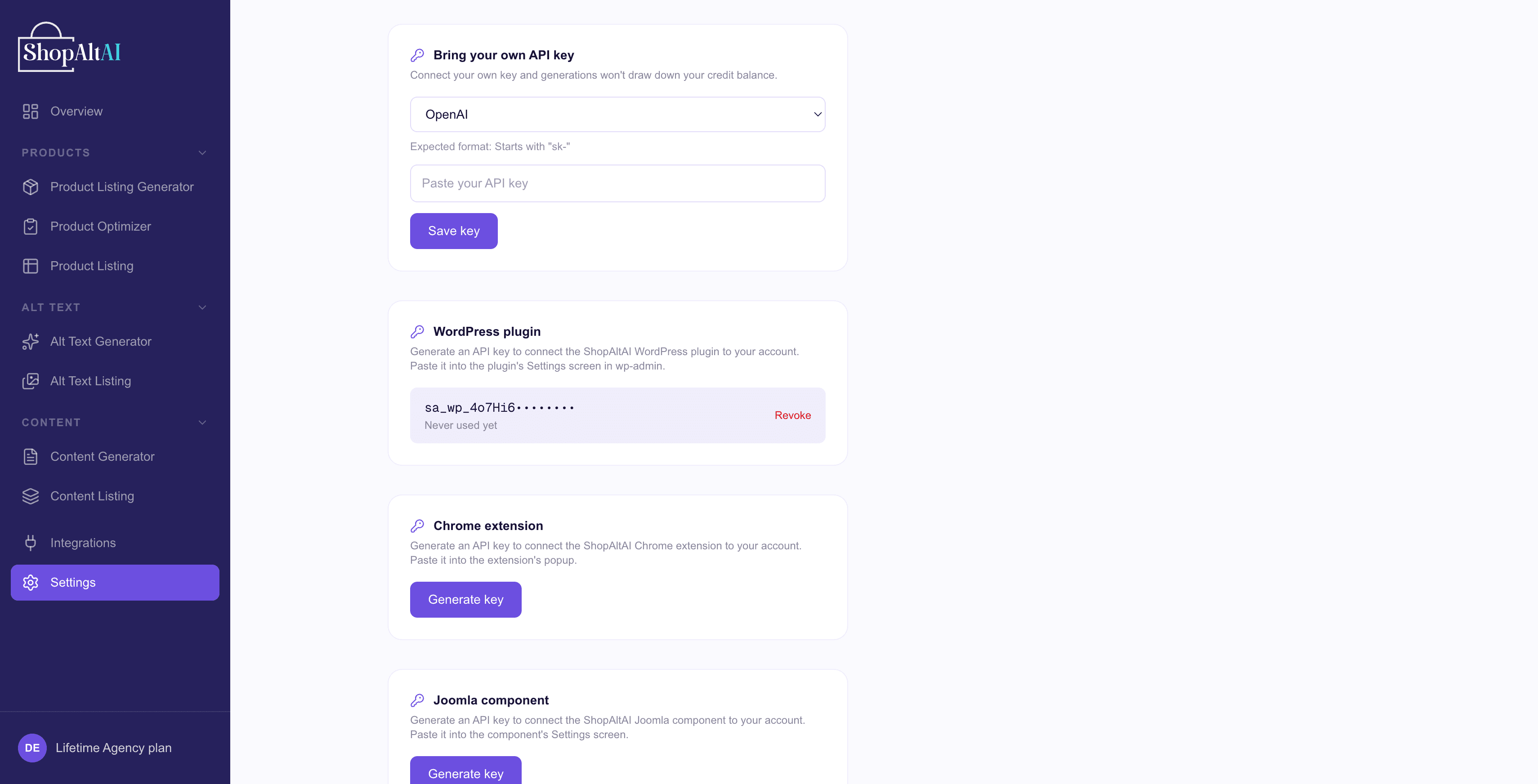
Choose the provider before pasting. A Gemini key saved as Claude fails every request, and the error won't obviously tell you why.
Check it works
Generate one alt text to check it works. If it succeeds, you're done — and it drew on your provider's account, not your monthly allowance.
BYOK is available on Starter, Professional, and Growth. If you're on Start Free, the key field won't accept a key — upgrade to one of the paid plans to unlock it.
Is my key safe?
Your key is encrypted before it's stored, using AES-256-GCM with a fresh random initialisation vector each time. It's decrypted only server-side, at the moment a generation runs. It's never sent to your browser, never written to logs, and never visible in the dashboard after saving — you'll only ever see a masked version.
You can replace it at any time. If you ever think it's been exposed, delete it in Google AI Studio and create a new one; the old key stops working immediately.
If something goes wrong
"Invalid API key"
Usually a mismatch between the key and the selected provider, or a stray space from copying. Check the prefix: AIza/AQ. for Gemini, sk-ant- for Claude, sk- for OpenAI and DeepSeek. Create a fresh one at the provider if it's been mistyped or deleted at their end.
Generation worked on Gemini, then stopped part-way through a big batch
Almost certainly the free tier's 250-a-day limit. Wait until tomorrow, or add a payment method in Google Cloud to raise it.
"Rate limit exceeded"
Too many requests too quickly. On Gemini's free tier that's about 10 a minute — it'll resolve on its own, or that's the daily cap if it keeps happening. Other providers have their own limits; wait a minute and try a smaller batch.
"Insufficient credits" or a billing error
This comes from your provider, not from us. Check your balance with them — Claude and OpenAI both need prepaid credit; DeepSeek needs its free grant not to have run out.
Generation is slower than usual
Different providers run at different speeds. This is normal and not a fault.
Everything fails immediately after saving the key
Check you selected the right provider. A key saved under the wrong provider (e.g. a Gemini key saved as Claude) will fail every request.
I'm on Start Free and can't add a key
Expected — BYOK is available on Starter, Professional, and Growth, not on Start Free. Upgrade to unlock the key field.
Common questions
Do I still need a ShopAltAI subscription?
Yes. BYOK covers the AI cost, not the platform — the generators, plugins, review workflow and store connections are what you're subscribing to.
Is BYOK cheaper?
It depends on volume. At a few hundred generations a month, a normal plan is simpler and usually cheaper once you count your own setup time. At many thousands, BYOK is substantially cheaper.
Can I switch back?
Yes. Change plan and remove the key; generation returns to your plan allowance.
Does Google see my product images?
Yes — generation sends the image to the provider you've chosen. That's true whether you use your key or ours. Google's API terms cover how they handle it.
What if my key runs out of credit?
Generation fails with an error from the provider. Nothing is lost, and nothing is charged to your ShopAltAI allowance — top up with Google and carry on.
Can I use Claude, OpenAI, or DeepSeek instead of Gemini?
Yes — all three are supported BYOK providers. Get a key from the provider's own site (console.anthropic.com for Claude, platform.openai.com for OpenAI, platform.deepseek.com for DeepSeek) and select it from the provider dropdown in Settings. None has Gemini's standing free tier — Claude and OpenAI need prepaid credits, DeepSeek gives new accounts a one-time credit grant. One real limit: DeepSeek is text-only and can't generate alt text or product listings (no image input support) — it only works for Content Generator.
Prefer to watch? See the video walkthrough.